VisualEditor is a "visual" way of editing Gamepedia that allows people to contribute without having to learn wikimarkup by providing a WYSIWYG interface. This rich-text editor was created and continues to be maintained by MediaWiki.org. It was made available as an opt-in release for existing users on all Gamepedia wikis in June 2015. User accounts created after June 10, 2015 and anonymous user have VisualEditor enabled by default.
To learn more about using VisualEditor, please read the VisualEditor User guide and the list of common keyboard shortcuts on the MediaWiki wiki.
To give your thoughts or feedback about VisualEditor, visit the Community discussion page.
How to enable VisualEditor
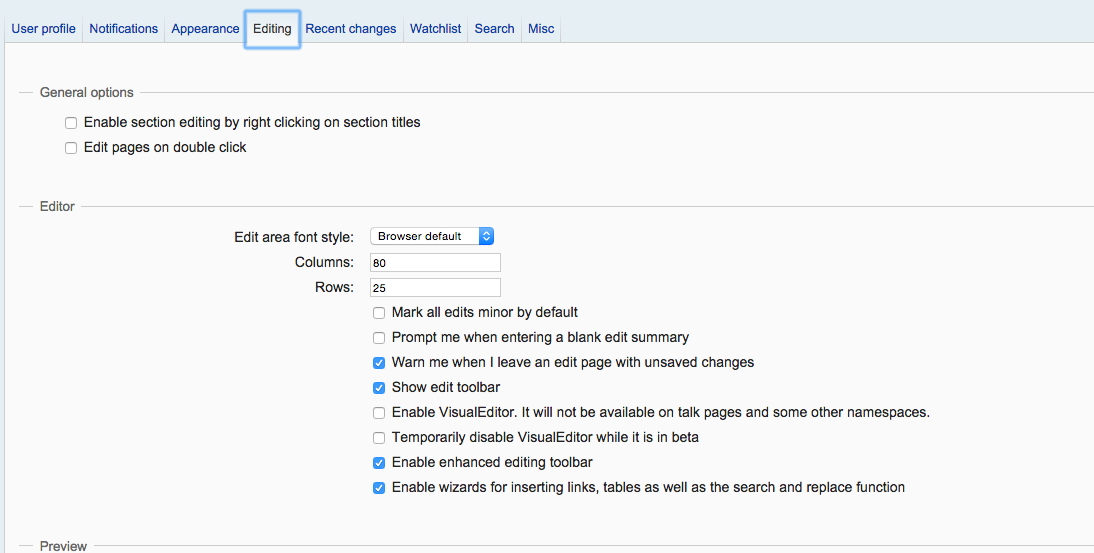

The "Editing" section of your preferences
- Navigate to your Preferences
- Select the "Editing" Tab
- In the "Editor" section, check "Enable VisualEditor'
Once enabled, the Edit button will trigger VisualEditor. You can still use the traditional editor by clicking the "Edit Source" button on any page. The VisualEditor setting is synced globally across all Gamepedia wikis.
How to disable VisualEditor
- Navigate to your Preferences
- Select the "Editing" Tab
- In the "Editor" section, uncheck "Enable VisualEditor'
Resources
Limitations
Current known limitations include:
- Slower – Loading longer pages into VisualEditor generally takes more time than the old wikitext editor, although this delay has been reduced significantly.
- Not available in talk or discussion namespaces – On Gamepedia, VisualEditor is only enabled in the Main and User namespaces. On pages other than those in the namespaces mentioned, the "Edit" button for VisualEditor is not available.
- Cannot edit a single section – VisualEditor loads and submits only entire pages. Clicking an "edit" link for a section causes VisualEditor to scroll to the section where the "edit" link was clicked. In VisualEditor's model, editing sections would be paradoxically slower than editing the whole page. Section editing does not reduce edit conflicts.
- Template parameters are wikitext, not rich edited – VisualEditor lets you edit the parameters of template transclusions, but only as "wikitext" (so "
[[Gamepedia Help Wiki]]" not "Gamepedia Help Wiki"). - Nested templates aren't very easy (e.g.
{{Template1|{{Template2}}}}) – VisualEditor lets you edit template transclusions which themselves use templates ("nested" templates). - Limited browser support – VisualEditor works only in relatively modern (last three years) versions of Chrome/Chromium, Firefox/Iceweasel, Internet Explorer 10 or higher, Safari, Opera, Midori, Qupzilla, SeaMonkey and WebPositive (approximately 93% of all users). VisualEditor does not yet work with Internet Explorer 9, and will never work with Internet Explorer 8 or older.[1]
- "Weird" templates – struggles with templates that pass a bit of incomplete code, with markup, to another template or table, such as ones that fill in multiple parameters of a table by passing, for example,
param1|param2- this is a difficult problem to code around, but usually unnecessary. - Incomplete editing functionality – The content of some "complex" formatting, including definition lists and multi-column layouts, will display and can be edited, but editors using VisualEditor cannot modify certain details, and table editing on mobile doesn't work properly. Adding features in this area is one of the developers' priorities.
Because of these limitations and the many remaining bugs in VisualEditor, the developers recommend that VisualEditor users click "Review your changes" before saving a page.
References